Modern businesses don’t really have “quiet times” any more.
Teams are on video calls all day, cloud apps are always in use, and even out‑of‑hours windows are squeezed by flexible working and global customers. Against that backdrop, the idea of switching the network off for a weekend to upgrade it feels unrealistic at best.
The good news: with the right approach, you can refresh cabling, switches and core infrastructure with little or no noticeable downtime for your users.
In this guide, we’ll walk through:
- What “no downtime” really means in practice
- The core principles of safe network upgrades
- A step‑by‑step approach to upgrading cabling and equipment
- Common mistakes that cause avoidable outages
How ACCL manages low‑risk changeovers for businesses across London and the South East

Why do network upgrades cause downtime in the first place?
Cabling and equipment projects typically cause disruption when:
- There’s no redundancy, so taking one device down stops everything
- Old kit is removed before new kit is online
- Cabling is changed without accurate records, so things get unplugged “to see what happens”
- Testing is rushed or skipped to hit a deadline
- Business‑critical services haven’t been clearly identified
Avoiding downtime is about reversing those patterns: plan, add, test, then remove – not the other way round.
Core principles of low‑risk network upgrades
Whatever you’re changing – cabling, switches, firewalls, core routers – the same principles apply:
- Know what you have (and what’s critical)
- Design the target state before you touch anything
- Introduce redundancy wherever possible before you cut over
- Stage changes in small, reversible steps
- Test as you go, not just at the end
- Communicate clearly with both IT and end‑users
Document everything so future changes are easier
Let’s turn those principles into a practical step‑by‑step approach.
Step‑by‑step: how to upgrade network cabling and equipment with minimal downtime
Step 1: Identify business‑critical systems and constraints
Before looking at cables or switches, talk to the people who rely on them:
- Which applications and services are mission‑critical?
- Are there hard blackout windows (e.g. trading hours, clinic time, production runs)?
- Are there regulatory or contractual penalties for outages?
Make a simple list of:
- “Absolutely cannot be down during these hours…”
- “Prefer not to touch during…”
- “Safe windows for maintenance…”
This gives you the framework for scheduling and phasing.
Step 2: Audit your existing network and cabling
You can’t plan a safe change if you don’t know what’s there now.
A structured cabling and network audit should capture:
- Current cabinet locations and contents
- Existing cable routes (including any unknown or legacy cabling)
- Which ports and links are in use – and for what
- Redundancy and failover paths (or lack of them)
This can be done in‑house if you have time and documentation, or with a specialist partner. ACCL’s cabling and network auditing services are often the first step before any major refresh, giving you a clear, factual baseline.
Step 3: Design the target state (not just the “next step”)
Rather than making isolated changes (one switch here, some cabling there), design the network you actually want:
- How many cabinets should you have – and where?
- Where should your core switches and firewalls live?
- Which links should be fibre or higher category copper?
- How will you segment the network (VLANs, routing, security zones)?
For larger sites, this is where structured data cabling design comes in: a consistent, standards‑based approach that supports future moves, adds and changes without repeated upheaval.
With a clear target architecture, you can then sequence changes intelligently instead of firefighting.
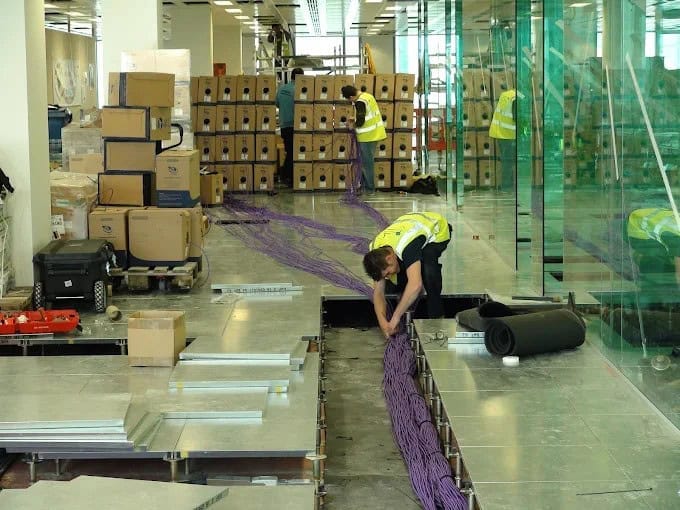
Step 5: Plan cabling works around people, not the other way round
Physical works – pulling cables, moving cabinets, drilling routes – are where users tend to notice disruption if it isn’t planned carefully.
Good practice here includes:
- Scheduling noisy or intrusive work out of hours where possible
- Sequencing floor‑by‑floor or area‑by‑area so the whole office isn’t affected at once
- Working closely with facilities and fit‑out teams during refits
If you’re already undertaking office changes, consider bundling network works into broader projects. ACCL’s IT refresh and maintenance services are often aligned with refurbishment programmes so cabling, switches and layout evolve together.
Step 6: Use temporary links and parallel running where needed
Sometimes you genuinely can’t add permanent redundancy before a change. In those cases, temporary measures can still protect you:
- Temporary point‑to‑point wireless links to maintain connectivity while cabling routes change
- Temporary switches or routers to carry traffic during a migration
- Short‑term rerouting of specific services (like VoIP) over alternative paths
The goal is always the same: never cut the only path until you’ve proved its replacement works.
Step 7: Agree clear change windows, communication and rollback plans
For each significant change, you should have:
- A defined change window (start and end time)
- A clear list of impacted services and locations
- A communication plan (who needs to know, and when)
- A rollback plan – what you’ll do if things don’t behave as expected
This doesn’t have to be heavyweight bureaucracy, but everyone involved should know:
- How to tell if the change has succeeded
- What conditions trigger a rollback
- Who makes that decision
Well‑run changes feel calm and predictable, even if they’re technically complex.
Step 8: Test as you go – not just at the end
Testing is where many projects fall down, especially when time is tight.
You’ll want to test at multiple stages:
- After cabling – continuity, performance and PoE where relevant
- After installing new equipment – basic connectivity and redundancy
During and after cutover – real application performance and failover behaviour
For cabling in particular, insist on documented test results for new runs and links. That’s your assurance that the new infrastructure can handle the speeds and loads you’re planning for.
Where cabinets have become messy over time, this is also a good moment to tidy them up. ACCL’s data cabinet tidy service is often paired with upgrades so you don’t bake new equipment into a chaotic environment.
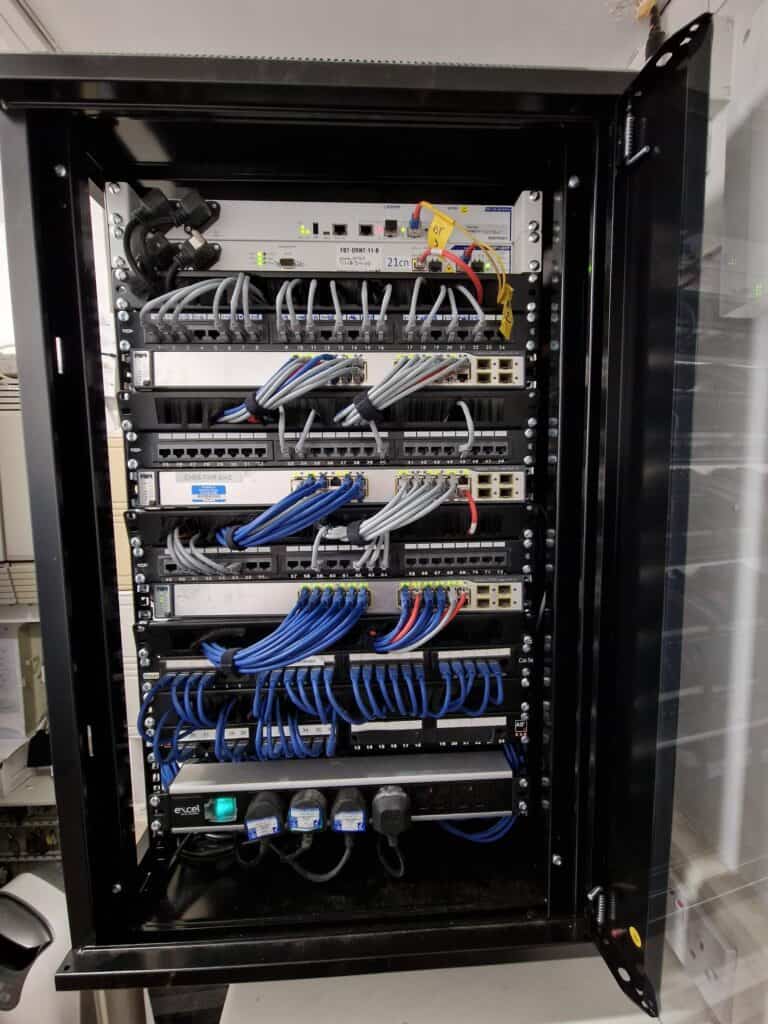
Special case: data centre and comms room relocations
Moving a core comms room or data centre is one of the highest‑risk network changes you can make. Thankfully, the same principles still apply – you just need more detail and more rehearsal.
A typical low‑downtime relocation plan will:
- Build out the new room in parallel – power, cooling, racks, cabling and core equipment
- Pre‑stage services where possible (for example, duplicating key servers or using virtualisation to move workloads gradually)
- Use temporary parallel links between old and new locations
- Migrate services in waves rather than one big bang
ACCL’s data centre relocation and wider data centre solutions are built around exactly this model – minimising risk while you move some of your most critical infrastructure.
Common mistakes that cause avoidable downtime
Even with the best intentions, certain patterns almost guarantee trouble:
1. Treating cabling as “just wires”
Ripping out or reusing cabling without proper testing and documentation often leads to:
- Devices left unpatched
- Mislabelled ports
- Hidden faults that only show under load
Treat cabling as a core part of the network design, not an afterthought.
2. Big‑bang cutovers
Changing:
- All core switches at once
- All uplinks between cabinets simultaneously
- An entire building’s cabling in a single weekend
…might look efficient on paper, but leaves no room to learn and adjust. Smaller, iterative steps are safer and often easier to manage.
3. Ignoring “non‑IT” systems
Networks now carry far more than PCs and printers. Forgetting about:
- CCTV and access control
- Building management systems
- EPOS and specialist devices
…can lead to some very unpleasant surprises when those systems quietly drop off the network during a change.
4. Underestimating the value of a tidy environment
Messy cabinets and unlabeled cables make even small changes risky. Taking the time to tidy and document before (or during) an upgrade can dramatically reduce accidental outages.

FAQs: Upgrading your network without downtime
Q: Can you really guarantee zero downtime?
In environments with no existing redundancy, it’s often impossible to promise absolute zero interruption. However, with good design and planning, any necessary downtime can usually be limited to short, controlled windows outside core hours, with clear communication and fallbacks.
Q: Do we need duplicate hardware to upgrade safely?
Not always, but having some spare capacity – extra switch ports, a second core switch, temporary links – makes life much easier. Part of the planning process is working out how to maximise the resilience you can achieve with the budget and hardware you have.
Q: How long does a typical upgrade take?
It depends on scope. A simple comms room refresh might be planned and executed over a few weeks; a multi‑site backbone upgrade or data centre relocation will be a longer, phased programme. The key is that user‑visible disruption is concentrated into small, well‑managed change windows, not the whole duration of the project.
Q: Is it worth upgrading cabling and equipment in stages?
Yes – staged upgrades are often both safer and more budget‑friendly. You might, for example, start with core links and busiest floors before moving on to secondary areas. A structured design ensures each stage builds towards the final target state, rather than creating new bottlenecks.
Q: Who should be involved in planning a low‑downtime upgrade?
Ideally, a cross‑functional group including IT, facilities, key business stakeholders (e.g. operations, finance, customer service) and your chosen cabling/network partner. That way, you capture both technical and business constraints from the outset.
If you know your network needs to move on, but the risk of downtime has been holding you back, a structured, survey‑led approach can break the deadlock. ACCL’s team is always happy to talk through your options, from quick wins to full refreshes, and help you plan a path that keeps your business online while your infrastructure catches up.


Written by
Wayne founded ACCL in 1997 and has led more than 28 years of project delivery, helping organisations design, install and modernise the network infrastructure behind reliable connectivity, office moves and refurbishments. His experience spans copper cabling, fibre backbones, data centre infrastructure, Wi-Fi, CCTV and access control. About ACCL