Your Guide to Wi‑Fi Site Surveys
This guide explains what a wi-fi site survey is, why it matters before installation, and what businesses should expect from a professional survey report.
If your business has ever suffered from “mystery” Wi‑Fi problems, black spots in certain rooms, calls dropping as people walk around or guest Wi‑Fi that’s hit-and-miss, there’s a good chance one step was skipped when it was installed: a proper Wi‑Fi site survey.
A Wi‑Fi site survey is a professional assessment of how wireless signal, RF interference, capacity and access point placement behave inside your building. For commercial networks, it shows where Wi‑Fi will work reliably, where coverage may fail, how many access points are needed, and what cabling, PoE capacity or switching changes may be required before installation or optimisation.
Most failing wireless networks weren’t installed with bad hardware. They were installed without enough information.
In this guide, we’ll explain in straightforward terms:
- What a Wi‑Fi site survey is
- Why surveys are essential before business Wi‑Fi installation
- What actually happens during a survey
- When you should book one
- How ACCL delivers survey-led designs that just work
Whether you’re planning a brand-new wireless network or trying to fix a troublesome one, understanding Wi‑Fi site surveys is the best place to start.
Who is this guide for?
This guide is for office managers, IT managers, facilities teams and project leads planning a new commercial Wi‑Fi installation, fixing unreliable business Wi‑Fi, or reviewing wireless coverage across offices, warehouses, schools, healthcare and hospitality environments.
If you are considering a commercial Wi‑Fi site survey in London or the South East, this page explains what to expect, what a business Wi‑Fi survey report should include, and how ACCL approaches survey-led wireless projects.
Why Wi‑Fi site surveys matter for businesses
You can install Wi‑Fi without a survey. Many organisations do. But the results are often:
- Fast in some areas, unusable in others
- Fine on quiet days, terrible when the office is full
- Strong signal bars, but poor call and video quality
A good Wi‑Fi site survey helps you:
1. Eliminate Wi‑Fi black spots before they appear
By measuring signal throughout the building, surveys reveal where coverage would be weak or blocked. You can then adjust access point locations or numbers before anything is installed – rather than discovering problems on day one.
If you’re already struggling with patchy coverage, ACCL’s guide on Wi‑Fi black spots shows just how many of them come back to missing or poor‑quality surveys.
2. Design for capacity, not just coverage
Coverage is only half the story. A site with 100 staff and a site with 400 staff look the same on a floor plan, but they behave very differently from a wireless point of view.
A proper survey and design process considers:
- How many people are in each area at busy times
- How many devices each person uses (laptop, phone, tablet, handhelds)
- What types of applications you rely on (Teams/Zoom, VoIP, cloud ERP, etc.)
This means your network is designed to cope when the office is genuinely busy, not just at 9am on a quiet Monday.
3. Avoid expensive redesigns and “rip and replace”
Fixing Wi‑Fi problems after installation usually means:
- Adding extra access points
- Moving existing ones
- Re‑running data cabling
- Retesting everything
That’s time‑consuming, disruptive and more expensive than doing it right from the start. A survey‑led design significantly reduces the risk of major rework.
4. Build a shared, documented understanding of your wireless network
A professional survey typically comes with:
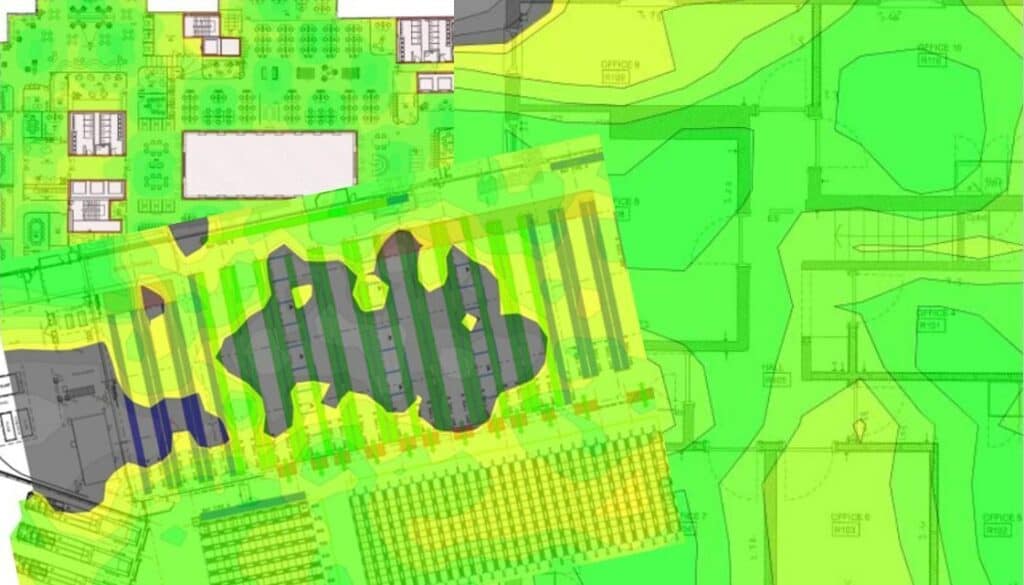
- Heatmaps showing coverage and signal quality
- A clear access point layout
- Recommendations for channel plans, power levels and hardware
That’s invaluable documentation for your IT team and future planning, so the whole network isn’t “in one person’s head”.
Together, these outputs form a practical business Wi‑Fi survey report that gives your IT and facilities teams a shared reference point for upgrades, troubleshooting and future planning. They also make it easier to align wireless design with related projects such as Wi‑Fi installation, structured cabling and switching upgrades.
Types of Wi‑Fi site survey
Different projects call for different survey techniques. You don’t need to become an RF specialist, but understanding the basics helps you ask the right questions.
Predictive (or desktop) survey
This is done from plans, often before a building is complete or accessible.
- Engineers use floorplans and details of wall materials, ceiling heights and intended usage.
- Software models how signal should travel and recommends access point positions.
Predictive surveys are ideal for new builds, refurbishments and early‑stage planning.
The output is usually a predictive Wi‑Fi heatmap survey showing expected coverage, likely RF interference and recommended access point placement before any hardware is installed. This is particularly useful when wireless design needs to be coordinated with wireless installation planning and cabling routes.
On‑site (or passive) survey
This happens in the actual building, often with temporary access points or using existing ones.
- Engineers walk the site with survey tools, measuring real‑world signal and noise.
- The result is a set of “heatmaps” showing how the network currently behaves.
On‑site surveys are essential when you’re fixing existing Wi‑Fi problems or validating a design before rollout.
This type of survey is especially valuable in occupied business environments, where neighbouring networks, dense device usage and building materials can affect real-world performance far more than a floorplan alone suggests.
For a technical overview of why measured RF behaviour matters, Cisco’s WLAN site survey guidance is a useful reference.
Post‑installation survey
Once the network is installed, a final survey checks that everything performs as expected:
- Confirms coverage and capacity targets are met
- Highlights any unexpected interference or weak areas
This is your quality‑assurance step, proving the Wi‑Fi does what it was designed to do.
For commercial projects, this validation stage confirms that users get the coverage, roaming and performance they were promised once access points, switching and supporting cabling are live. It also supports smoother handover into long-term wireless network support.
In many projects, ACCL will blend these approaches, using predictive design early on and then validating it with on‑site measurements.

3. Analysis and design
Back at base, the survey data is analysed to:
- Identify current coverage and quality
- Highlight interference, noise and channel congestion
- Model proposed access point locations and configurations
This is where the magic happens: turning raw measurements into a concrete, practical design you can implement.
4. Reporting and recommendations
You should receive a clear, non‑technical summary as well as technical detail, typically including:
- Coverage heatmaps (before and after proposed design)
- Recommended access point locations and mounting guidance
- Channel and power plans
- Any cabling or switching requirements to support the design
At ACCL, we align this directly with your Wi‑Fi installation projects, so the survey flows naturally into procurement, cabling and deployment. You can see how that fits into our broader Wi‑Fi installation service.
What should a Wi‑Fi site survey report include?
A professional commercial Wi‑Fi site survey should give you more than a basic coverage map. For most business environments, the report should include:
- Coverage heatmaps showing signal strength, roaming behaviour and weak areas
- RF interference and noise findings, including congestion from neighbouring networks
- Recommended access point locations and mounting positions
- Channel and transmit-power recommendations
- Capacity planning based on users, devices and applications
- Any supporting cabling, switching or PoE requirements
- A clear summary for non-technical stakeholders
- Practical next steps for installation, remediation or optimisation
This is where a survey becomes commercially useful: it gives your IT, facilities or project team a documented basis for budget, deployment and future network decisions.
ACCL’s commercial Wi‑Fi site survey service and Wi‑Fi deployment support are designed to connect survey findings directly to delivery.
Common problems a Wi‑Fi survey uncovers
If you’re already living with flaky Wi‑Fi, a survey is often a moment of clarity – it makes visible what’s been invisible.
Typical issues we see in business environments include:
1. Access points in the wrong places
- Installed where there was a spare socket, not where coverage is needed
- Mounted in cupboards, above ductwork or behind metal fittings
- Too many APs bunched together, causing self‑interference
A survey shows exactly where APs should be, not just where they happened to end up.
2. Over‑reliance on signal bars
“Full bars” on a device doesn’t always mean good performance. Surveys reveal:
- High signal strength but poor signal quality due to noise or interference
- Channels overloaded with clients in high‑density areas (e.g. meeting rooms)
In other words, the Wi‑Fi can look fine but still behave badly without proper analysis.
A Wi‑Fi site survey measures both signal strength and signal quality, highlighting where RF interference or congestion is causing problems even when devices appear to have “full bars”.
3. Coverage leaking into the wrong areas
It’s surprisingly common to see strong Wi‑Fi in stairwells, car parks or outside the building, while critical meeting rooms struggle. Surveys allow you to pull signal back into the building, where it’s actually needed.
4. Legacy cabling and infrastructure issues
Wi‑Fi problems often turn out to be:
- APs fed by old or low‑quality cabling
- Bottlenecks at old 100 Mbps switches
- Poor cabinet layouts making changes risky
While the survey focuses on wireless, an experienced provider will flag these underlying issues and factor them into their recommendations.

What to look for in a Wi‑Fi survey provider
Not all “site surveys” are equal. When you’re choosing a partner, consider:
1. Do they specialise in business Wi‑Fi?
You want a team that regularly works in:
- Multi‑storey offices
- Warehouses, logistics and industrial sites
- Schools, hospitals, hospitality and public venues
This is very different to home Wi‑Fi. ACCL’s corporate wireless solutions are built specifically around busy, high‑density commercial environments.
2. Do they also understand cabling and switching?
A survey that ignores the wired side can only ever solve half the problem. Look for a provider that can:
- Assess your cabling and cabinet layouts
- Advise on switching and Power over Ethernet (PoE) capacity
- Deliver end‑to‑end solutions, not just a report
3. Will you get clear, usable documentation?
Ask to see examples (with any sensitive details redacted). You should expect:
- Heatmaps that non‑technical stakeholders can understand
- Clear access point layouts and counts
- Specific, actionable recommendations – not just theory
4. Can they support you after the survey?
Ideally, your survey provider should be able to:
- Implement the recommended design
- Optimise and maintain the network over time
- Help with future expansions and changes
That way, your survey isn’t a one‑off exercise – it’s the foundation of a long‑term wireless strategy.
ACCL supports commercial Wi‑Fi projects across London, Kent, Surrey and the wider South East, combining wireless survey work with structured cabling, switching, cabinet tidy services and installation support.
That means survey findings can be turned into a practical implementation plan, rather than left as a standalone technical report. For an independent explanation of wireless survey best practice, Ekahau’s guide to Wi‑Fi site survey best practices is also worth reviewing.

Frequently asked questions
Do we really need a Wi‑Fi site survey for a small office?
For very small, single-room offices with under 10 users, you may be able to get away with a simple, well-placed access point and some basic checks. As soon as you have multiple rooms, floors, meeting spaces or a high density of users and devices, a survey becomes much more important if you want predictable performance.
How long does a Wi‑Fi survey take?
It depends on the size and complexity of the site. A single-floor office can often be surveyed in a few hours, while multi-floor buildings and campuses take longer. The important thing is that the survey is thorough, because cutting corners here usually leads to bigger problems later.
Will a survey disrupt our day-to-day operations?
A Wi‑Fi site survey is generally low-impact. Engineers walk the building with laptops or tablets, quietly taking measurements. In most offices, staff barely notice it happening. Any tests that might affect performance, such as trial access point placements, are planned and agreed in advance.
Can a survey fix our Wi‑Fi problems, or do we still need new hardware?
The survey itself does not fix the problem, but it tells you exactly what needs to change. Sometimes that is as simple as moving or reconfiguring existing access points. In other cases, new hardware or cabling is recommended. The value of the survey is that you stop guessing and start making informed decisions.
What does a business Wi‑Fi survey report actually include?
A typical report from a commercial Wi‑Fi site survey includes coverage heatmaps, RF interference and noise analysis, recommended access point locations, channel and power plans, and clear next steps for any cabling or hardware changes. It should be understandable to both technical and non-technical stakeholders, so the survey can support decisions on budget, installation and future upgrades.
Is a Wi‑Fi site survey a one-off, or should it be repeated?
You do not need a survey every year, but it is smart to repeat one when you renovate or significantly reconfigure an office, add new floors or buildings, or introduce major new wireless-dependent systems such as VoIP, scanners or IoT devices.



Written by
Wayne founded ACCL in 1997 and has led more than 28 years of project delivery, helping organisations design, install and modernise the network infrastructure behind reliable connectivity, office moves and refurbishments. His experience spans copper cabling, fibre backbones, data centre infrastructure, Wi-Fi, CCTV and access control. About ACCL