Why wireless now sits at the heart of modern offices
Today’s workplace is a wireless workplace. Collaboration platforms, high-resolution video conferencing, cloud apps, IoT sensors, location services, guest access and smart building systems all assume robust, low-latency connectivity everywhere people work. The challenge for IT and estates teams is that demand isn’t just growing; it’s compounding—more devices, higher bit-rates, denser spaces, and stricter security expectations.
Wi-Fi 6E and Wi-Fi 7 are available generations that can change what is practical in production environments. They add spectrum, boost throughput, tame contention, lower latency, and bring deterministic QoS within reach. But the radio is only half the story. Your cabling, switching, PoE power budget, design methodology and RF planning determine whether your next-gen wireless actually performs.
This guide explains what Wi-Fi 6E and Wi-Fi 7 deliver, how they differ, and how to prepare your estate, from cabling and power to survey, design and phased adoption.

Where 6E fits best:
- High-density collaboration spaces, project rooms, agile floors
- Executive meeting suites and hybrid boardrooms
- Media/creative teams moving large assets to/from the cloud
- Environments sensitive to interference (labs, R&D, healthcare admin)
Caveat: 6 GHz is shorter-range than 5 GHz and more easily attenuated by walls or glass. Expect more APs in like-for-like coverage, and more careful RF planning.
What is Wi-Fi 7?
Wi-Fi 7 (802.11be) builds on 6E and brings a step change in determinism and multi-link intelligence. Core innovations include:
- 320 MHz Channels
Doubling the maximum channel width (where regulations permit) for very high peak rates on compatible clients. Even if you don’t use 320 MHz everywhere, the optionality matters for future workflows. - Multi-Link Operation (MLO)
Clients and APs can bond links across bands (e.g., 5 GHz + 6 GHz) or maintain parallel links. This delivers lower latency, higher reliability and faster handoffs—ideal for real-time collaboration and AR/VR training. - 1024-QAM → 4K-QAM
Higher modulation density increases throughput for strong-signal clients, improving short-range performance in meeting rooms and hot-desking areas. - Enhanced OFDMA and scheduling
Better multi-user handling, smarter resource unit allocation, and queue management that reduces head-of-line blocking—a boost for offices with many concurrently active apps.
What this means in practice:
Wi-Fi 7 helps large offices reach predictable, low-latency performance under load. Think of MLO as a way to “hedge” against transient interference and deliver consistent experience during busy hour.
Key differences between Wi-Fi 6, 6E and 7 (executive summary)
- Band access
- Wi-Fi 6: 2.4 GHz & 5 GHz
- Wi-Fi 6E: + 6 GHz (cleaner air, wider channels)
- Wi-Fi 7: Uses 2.4/5/6 GHz; MLO to aggregate/balance links
- Wi-Fi 6: 2.4 GHz & 5 GHz
- Channel widths
- Wi-Fi 6: up to 160 MHz
- Wi-Fi 6E: up to 160 MHz (more clean 160 MHz options)
- Wi-Fi 7: up to 320 MHz (regulatory-dependent)
- Wi-Fi 6: up to 160 MHz
- Latency & determinism
- 6/6E improved over 5/ac via OFDMA/BSS Coloring
- 7 adds MLO for lower latency and resilience
- 6/6E improved over 5/ac via OFDMA/BSS Coloring
- Throughput headline (environment-dependent)
- 6/6E: Gigabit-class per client, multi-gig per AP aggregate
- 7: Multi-gig per client possible at short range; AP uplinks should be multi-gig
- 6/6E: Gigabit-class per client, multi-gig per AP aggregate
- Design implications
- 6E requires more APs (shorter range at 6 GHz)
- 7 benefits from multi-gig switching, higher PoE budgets, and Cat6a/above cabling

Cabling, power and backhaul: the foundations of next-gen Wi-Fi
Upgrading radios without upgrading the foundations is a false economy. To unlock the promise of 6E/7, confirm the following:
Structured cabling (horizontal)
- Category: For new pulls, Cat6a is the enterprise baseline. It supports 2.5/5/10 GbE and higher-power PoE with better thermal characteristics and margin for growth. If you’re uncertain about the cable trade-offs, our primer on cable categories is a useful refresher: The simple differences between Cat5e, Cat6, Cat6e, Cat6a, Cat7 and Cat8.
- Density: Plan for more APs when using 6 GHz—shorter range and higher attenuation mean denser grids for high-quality coverage. That implies more outlets and spare pulls in strategic locations.
- Pathways: Maintain separation from EMI sources, manage bundle sizes (PoE heat), and keep pathways serviceable for future adds/moves/changes.
Switching and uplinks
- Multi-gig access: Adopt 2.5/5 GbE at the edge where AP density and client mix justify it (Wi-Fi 7 especially).
- Uplinks: Provide 10 GbE uplinks from access to distribution where AP counts per switch are high, or where APs use 160/320 MHz channels.
- Feature set: Look for QoS, mDNS controls, fast L3 roaming support, and robust telemetry.
Power over Ethernet (PoE)
- Budget: Newer tri-radio and Wi-Fi 7 APs can draw 25–40 W+. Ensure switch PoE budgets and per-port classes (PoE+/UPoE/802.3bt) match worst-case loads.
- Thermals: With higher PoE, cable bundle temperatures rise. Cat6a’s larger conductor size helps; keep bundles within safe fill and consider ventilation in risers and cabinets.
Backbone and fibre
- Backhaul headroom: Core links and risers should be dimensioned for multi-gig AP aggregates, especially in high-density floors. Upgrading fibre optics or optimising topology may be prudent before an AP refresh.
- Redundancy: Dual-homed switches, diverse fibre routes and resilient power underpin the “always-on” expectations of wireless-first workplaces.
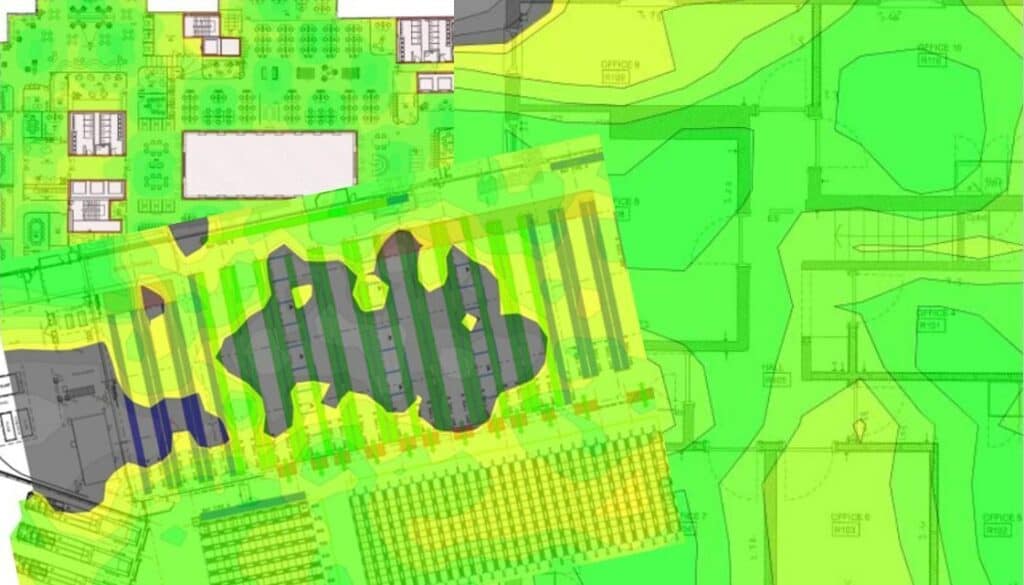
If you’re modernising legacy infrastructure, these practical steps will help: Effective Wi-Fi installation (planning and pitfalls) and our Wi-Fi site surveys service for evidence-based design
When to upgrade: practical adoption scenarios
Every estate is different, but the following patterns work well:
- Event-driven refresh (Wi-Fi 6E now)
If you’re refreshing switching or cabling as part of an office fit-out, add 6E-capable APs and multi-gig edge now. You’ll capture immediate benefits in cleaner spectrum and better performance for modern clients. - Targeted zones first
Prioritise boardrooms, collaboration suites, executive areas and high-density floors. These zones see the most benefit from 6 GHz and improved scheduling. - Prepare the core for Wi-Fi 7
Upgrade Cat6a, PoE budgets and multi-gig switching so the next AP refresh (Wi-Fi 7) is a smooth optics-and-firmware exercise, not a building-wide rewire. - Client mix reality check
6E adoption among laptops is already healthy; Wi-Fi 7 devices are ramping. Track your device inventory and stage upgrades where compatible clients are concentrated. - High-density venues
Large venues and campuses with demanding concurrency (events, retail concourses, auditoria) should look at Wi-Fi 7 sooner, to leverage MLO and higher scheduling efficiency. For context on high-footfall, performance-critical environments, see our work with elite sport: ACCL provides complete solutions for Southampton FC.
Governance, security and operations: don’t overlook the “day two”
- WPA3 and segmented design
Standardise WPA3-Enterprise where possible, clean up SSID sprawl, and use roles/VLANs to separate corp/guest/IoT with least privilege. - Observability
Instrument the wireless edge: client SNR, retries, airtime utilisation, QoS queues, AP CPU/memory, PoE draw and switch port errors. This is essential for proactive operations. - Change discipline
Treat RF changes like code: version, test, roll back. Use maintenance windows for channel plan changes on busy floors. - Lifecycle
Align access-point firmware and controller code with the security policy, vendor support lifecycle, capacity reviews and service requirements. Set refresh dates from those conditions rather than a universal five- or seven-year interval.
Final thoughts & next steps
Wi-Fi 6E and Wi-Fi 7 turn wireless into a platform you can plan around, not a convenience you hope behaves. Success depends on foundations (Cat6a, multi-gig, PoE) and on evidence-led design. If you want the wireless experience to feel wired—everywhere, for everyone—start with a survey, model for capacity (not just coverage), and stage adoption where it moves the needle fastest.
- If you’re ready to validate your environment and build the business case, book a Wi-Fi site survey.
- Planning a broader upgrade across offices or a campus? Our team designs and delivers end-to-end wireless network installation and support that aligns cabling, switching, power and RF—so the whole system performs as one.
Frequently asked questions
Is Wi-Fi 6E worth it for offices?
Yes, 6 GHz provides cleaner spectrum and wider channels, improving reliability and lowering latency in busy offices. Expect denser AP grids and better planning to realise the gains.
Do we need new cabling for Wi-Fi 7?
If you have Cat6a and multi-gig switching with adequate PoE, you’re in a strong position. Older Cat5e/Cat6 may constrain 2.5/5/10 GbE uplinks and higher PoE classes.
Will Wi-Fi 7 end buffering?
It won’t break physics, but MLO, wider channels and better scheduling make performance more predictable under load, which is what users perceive as “no buffering”.
Should we jump straight to Wi-Fi 7?
If your device mix and budget allow, yes—especially for high-density or performance-critical spaces. Otherwise, deploy 6E now with an infrastructure path to 7.
Will 6 GHz work everywhere in my building?
It works best in open spaces and modern materials; heavy attenuation (e.g., older concrete or metalised glass) may require more APs or band steering to 5 GHz where appropriate.
Do we need 320 MHz channels now?
Not necessarily. They’re situational. Many offices will standardise on 80 MHz for efficiency and use 160/320 MHz selectively where client density and proximity justify it.
What about IoT and smart building devices?
Segregate IoT onto appropriate bands/SSIDs, and consider PoE-powered sensors where possible to simplify power and boost reliability. (We can advise during survey.)


Written by
Wayne founded ACCL in 1997 and has led more than 28 years of project delivery, helping organisations design, install and modernise the network infrastructure behind reliable connectivity, office moves and refurbishments. His experience spans copper cabling, fibre backbones, data centre infrastructure, Wi-Fi, CCTV and access control. About ACCL