Works with door access
CCTV designed alongside your door entry and alarms.

CCTV Installation Services
Office CCTV covering entrances, car parks and shared areas without feeling intrusive, integrated with access control and alarms.
CCTV designed alongside your door entry and alarms.
Entrances, shared areas and car parks on one system.
Storage modelled on resolution, frame rate and motion.
CCTV and access control in one 17,710 sq ft fit-out.
Recent office work: Foresight Group, The Shard and Cabot Financial, Kings Hill
Office CCTV
ACCL installs business CCTV systems for offices across London, Surrey and Kent. One accountable team surveys, designs, installs and documents the system, so footage is clear, retention holds and Facilities and IT can run it day to day.
Survey-led commercial CCTV for London businesses.
Explore CCTV →Door access linked to video for faster review.
Explore access control →Cameras, doors and alarms managed on one platform.
Explore IP security →CCTV for branches, trading floors and City offices.
Explore bank CCTV →Recent projects
Office CCTV we have designed and installed.

Cabling, Wi-Fi, AV, audio, CCTV and access control delivered as one technology package for a 17,710 sq ft Level 23 office.
Read the case study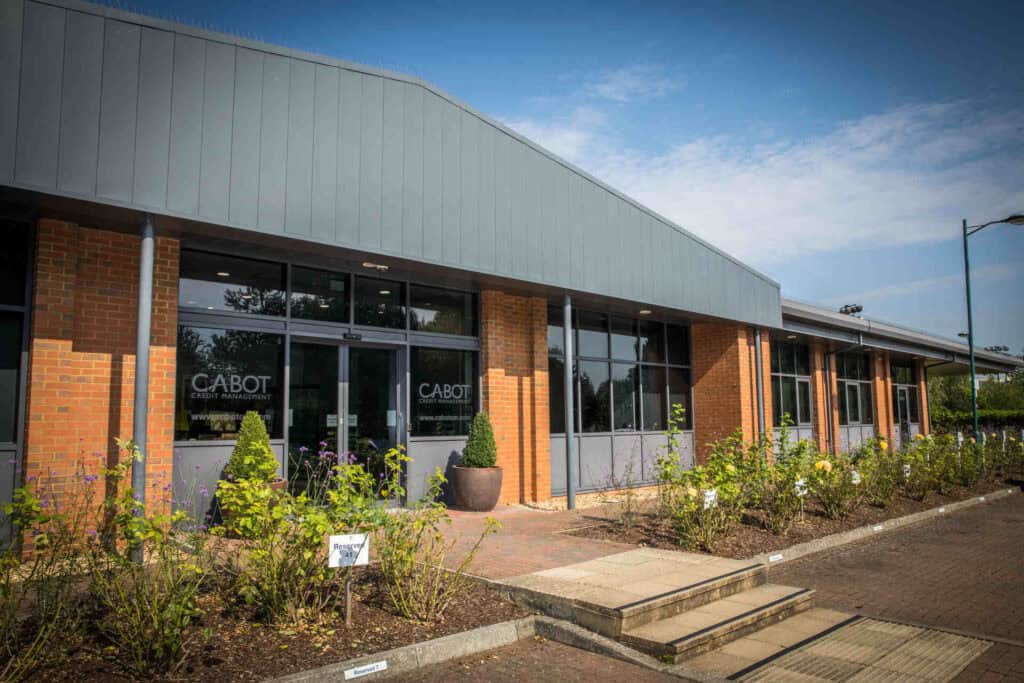
A unified Avigilon CCTV and access control system across a multi-building campus in Kent: 43 cameras and 32 doors.
Read the case study
76 Hikvision CCTV cameras, 42 Paxton-controlled doors and structured cabling across a London head office and two healthcare clinics.
Read the case study
539 warranted Cat 6A links, wireless and CCTV cabling and a rationalised communications room, phased around a live fit-out.
Read the case studyCCTV guide
Office CCTV installation covers every area where staff, visitors and vehicles move, plus the storage, user access and documentation behind the cameras.
Modern offices need CCTV that delivers clear, actionable footage without creating privacy or compliance risk. From receptions and lift lobbies to open-plan floors, meeting suites, plant rooms and car parks, a well-designed system deters incidents, speeds investigations and protects people and assets. A poorly planned one leaves blind spots, unusable footage and admin burden. ACCL designs and installs office-ready CCTV across London, Surrey and Kent. We engineer coverage for identification where it matters, right-size storage for your retention policy, and hand over simple workflows your Facilities and IT teams can run, all backed by tidy, labelled infrastructure and documentation.
Most office CCTV problems come from five design faults, and each one can be fixed at survey stage.
Cameras mounted too high or framed too wide won’t meet identification standards. We specify lensing and height so critical choke points (receptions, turnstiles, entrances) capture reliable facial detail.
Lift lobbies, stair cores and corridor junctions are often missed. Our designs map people flow throughout the day and close gaps.
Weeks of retention shrink to days when resolution and frame rate creep. We model bitrates and apply smart rules (continuous at entrances, event-based elsewhere) so you actually keep what policy requires.
Multiple vendors and unmanaged firmware make export painful. We standardise your VMS and naming to speed searches and evidence handling.
Flat admin roles, weak access control and unclear signage create exposure. We build privacy by design into setup and hand over the paperwork you need.
For a broader overview of options and costs, see our CCTV Installations guide.
Cameras go where people and vehicles pass through choke points, with each view framed for the detail that area needs.
Wide dynamic range (WDR) domes and turrets handle back-light from glazing. Varifocal lenses let us frame for face ID at the target distance, for example at the visitor sign-in desk or turnstiles.
“Corridor mode” streams suit long runs, preserving pixels where you need detail. Overlapping views at junctions remove hiding spots.
Higher detail at doors and racks; correct PoE and labelled patching ensure reliability. When cabinets are messy, a Data Cabinet Tidy prevents intermittent faults that look like “camera issues.”
Low-light and IR models capture plates and faces; ANPR is available where vehicle control is needed. We match housings and brackets to the environment and factor motion and lighting to avoid overexposure.
We use privacy masking for neighbouring premises and non-security areas (for example, break rooms) and tune retention to your policy. Where systems also capture sound, see our guide to audio recording and employer obligations.
Reliable cameras depend on the cabling, power and storage behind them, so ACCL designs that layer first.
A well set-up video management system (VMS) lets your team find, review and export footage in minutes.
For planning fundamentals (camera types, placement, policies), our CCTV Planning and Design guide is a useful reference.
Privacy is built into the set-up, so access, retention and signage support your obligations from day one.
If you need a quick compliance walkthrough, see our GDPR: CCTV Compliance Checklist.
Office CCTV can link to access control, alarms, wireless links and the wider network.
Door events and alarms link to video for rapid review, improving incident response (compare our Commercial Access Control Installation).
Cameras feed a unified IP security platform if you want single-pane management (IP Security System Installation).
For remote car parks and outbuildings we deploy engineered point-to-point links and validate throughput and latency.
Where switching or cabling is the constraint, we phase remediation under out-of-hours windows (start with Structured Data Cabling).
ACCL installs office CCTV in five stages, with noisy work out of hours so the office keeps running.
Map risk areas, visitor routes, loading bays and secure spaces; agree change windows and building rules.
Annotated plans with heights, fields of view, codecs and storage modelling.
Discreet containment, safe access and daily reinstatement; noisy works evenings and weekends.
VMS policies, user roles, alerts and export workflows agreed with Facilities and IT.
Camera register, admin run-book, as-builts, IP schema and change log, ready for audits and insurers.
Need the fundamentals of angle, height and FoV? Our quick CCTV Camera Placement Guide helps align expectations.
Facilities, Security and IT teams each gain clearer evidence, faster investigations and lower risk.
Correct framing and bitrates produce recognisable faces and plates where it matters.
Consistent naming, maps and bookmarks make export a five-minute job.
Role-based access, masking and automatic retention reduce privacy exposure and support audits.
Storage sized once, not emergency buys later; standardised hardware simplifies spares and support.
Designs leave headroom for analytics such as people counting, additional cameras and multi-site federation.
Start with a free survey of your office.
If your current system has blind spots, blurred faces or storage gaps, let’s fix the foundations. Book a no-obligation office CCTV survey and we’ll map risks, model coverage and deliver a phased, GDPR-ready upgrade plan that fits your change windows.
Before you book
No. Resolution is matched to scene width and identification distance. Critical choke points may merit higher resolution; wide areas often benefit more from positioning and optics.
Often yes. We test and retain what’s sound and replace only where it lifts quality, reliability or retention compliance.
We’ll align retention to your policy and risk profile, then enforce it in the VMS so it doesn’t silently drift.
Yes, with appropriate roles, Multi-Factor Authentication and logging. We’ll configure secure access to fit your governance.
We phase works out-of-hours for noisy tasks and isolate small zones during the day. Each area is reinstated before staff return.
We design closer framing at doors and racks and ensure PoE and cabinet airflow are within spec; a cabinet tidy often cures “mysterious” dropouts.
Yes. ACCL installs office and business CCTV across London, Surrey and Kent, from single floors to multi-building campuses. At Cabot Financial in Kings Hill, ACCL installed one Avigilon CCTV and access control system with 43 cameras and 32 doors.
Cost depends on the number of cameras, cabling, storage and integration. The site survey is free, and you receive an itemised quote before any work starts. A fixed-price proposal follows within 48 hours of receiving your floor plans.

The team behind your CCTV project
Wayne Connors founded ACCL in 1997 and has led our commercial cabling projects ever since. We’re a member of the London Chamber of Commerce and Industry.
Free CCTV site survey
One of our own engineers surveys your site at no cost and with no obligation.
Excellent · 60+ Google reviews · Founded 1997 · £10m liability cover
Expert Insights

Many potential CCTV users don’t reap the benefits of this flexibility.
Read guide
There are at least 500,000 CCTV cameras in London, and most of them are installed on private premises, including workplaces.
Read guide
It is perfectly reasonable to have CCTV installed at your workplace.
Read guideBrowse practical guidance, industry updates and planning tools for commercial network infrastructure projects.
Active Communication Company Ltd trades as ACCL, ACCL Data Cabling London and ACCL Data Cabling Kent · Commercial data cabling and network infrastructure specialists