Why network cabling decisions have a huge impact
Every strategic technology decision made in a modern workplace stacks on the same foundation: your physical network. Cloud migration, Wi-Fi 6E/7, IP telephony, 4K/8K conferencing, access control, smart building systems, and always-on security monitoring all rely on deterministic, low-loss, low-latency links. When underlying cabling is underspecified or ageing, everything above it becomes unstable, expensive to maintain, and difficult to scale.
The question isn’t “should we upgrade?” so much as “when is the right moment, and what should we upgrade to?” As an accredited, design-led contractor, our view at ACCL is pragmatic: upgrade when constraints in performance, reliability, compliance, or operations begin to erode user experience or total cost of ownership. This guide explains the tell-tale signs, the business triggers, and a sensible pathway to a future-proof, standards-aligned cabling layer.
(If you need a primer first, our Essential Guide to Data Cabling offers a helpful orientation to terminology and components.)
→ Essential guide to data cabling

Signal 3: Noise and errors in electrically “busy” buildings
In offices with distributed power, lifts, HVAC plant, and dense LED lighting, EMI can provoke frame errors and retries on marginal runs. If error counters climb under load, if you have unpredictable drops near plant rooms, or if shield termination is inconsistent, you’re looking at a standards or workmanship shortfall that merits replacement.
Signal 4: Compliance and safety gaps
Cabling touches fire stopping, containment, earthing and bonding, and penetrations through risers and compartment walls. If audits reveal non-rated patch cords, missing labels, unsealed penetrations, or cabinets with unsafe load distribution, you have regulatory risk that can’t be solved by swapping a switch. Remediation usually pairs with a structured upgrade.
Signal 5: Operational drag—MAC rates and cabinet sprawl
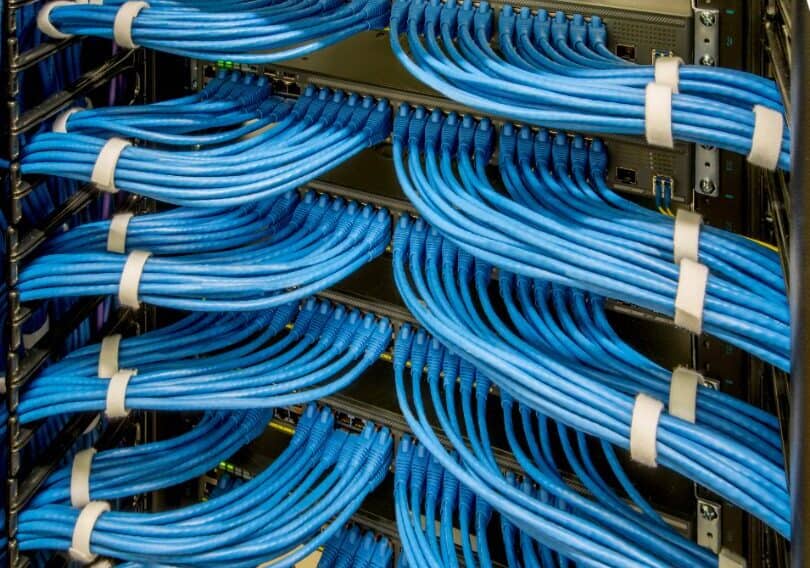
When Moves, Adds and Changes consume too much time, or cabinets are a spaghetti of unlabelled patching, brittle trays and no slack management, you’re losing OPEX and resilience. Clean, labelled structured cabling with rationalised pathways, documented circuits, and cabled capacity for growth cuts MTTR and supports agile workplace change.
Business triggers that justify action (even when things “still work”)
- Strategic Wi-Fi refresh: Moving to Wi-Fi 6E/7 without Cat6a and multi-gig (2.5/5/10 GbE) at the edge is a false economy. New APs will be bottlenecked, and PoE draw may exceed legacy budgets.
- UC and high-definition collaboration: 4K/8K rooms, spatial audio, and AI noise reduction increase uplink stability requirements. Cabling must support deterministic QoS and low jitter to meeting suites and media teams.
- Security modernisation: Consolidating analogue to IP CCTV, adding analytics, and extending retention increases uplink bandwidth and PoE needs to edge cameras and aggregation closets.
- Smart building/IoT rollout: Lighting, occupancy, air quality, and wayfinding sensors favour PoE, consistent labelling, and segmented pathways—hard to retrofit piecemeal onto ad-hoc legacy runs.
- Lease events / fit-outs: The cheapest time to upgrade cabling is during planned churn—when ceilings are down and trades are on site.
- Risk reduction: Known defects in fire stopping, earthing, or containment represent an insurable risk. Upgrading lets you close audit actions and simplify future compliance cycles.
How to tell if your current cabling is holding you back (without guesswork)
a) Instrumented testing and certification
A professional cabling audit runs more than continuity checks. Expect:
- Tier-1/Tier-2 fibre tests (insertion loss/OTDR) and copper certification to category with NEXT/PSANEXT, RL, and propagation delay.
- PoE verification under load at representative outlets.
- Environmental/thermal checks of key bundles and enclosures.
- Label reconciliation against rack elevations and floor plans.
If you need a structured assessment, our field teams deliver independent pass/fail reporting and actionable remediation plans.
→ Data cabling audits
b) Observability from the network side
Switch telemetry (FCS errors, CRCs, symbol errors, late collisions on legacy segments), PoE power derates, and per-port SNR for AP uplinks are strong proxies. If you see errors correlated with HVAC cycles or lift operation, you likely have EMI susceptibility in part of the run.
c) Physical inspection
Look for tight bend radii, crushed bundles under trays, overfilled conduits, cable jacket damage, unsealed penetrations, and unmanaged patch fields. Cabinets with poor airflow and ad-hoc PDU placement are OPEX traps and a reliability risk.
Design principles for an upgrade that lasts
- Engineer for capacity, not just connectivity
Start from busy-hour workloads (calls, streams, backups, camera concurrency). Dimension uplinks, switch buffers, and cable plant for that reality, not an empty building. - Rationalise topology
Avoid daisy-chained small switches in ceilings. Aggregate in properly cooled, powered, and labelled telecoms rooms with diverse fibre routes where possible. - Standardise patching and labelling
Use durable printed labels and a schema that encodes floor, cabinet, RU, panel, port. Documentation must be a living artefact—not a PDF that diverges from reality. - Plan PoE like power engineering
Model worst-case draw across device profiles (APs, phones, cameras, sensors), account for inrush, and keep thermal margins for cable bundles and enclosures. - Containment and segregation
Keep power and data separation to standards, install compliant fire stopping, and use pathways that allow future pull-through without disruption. - Security & segmentation at the edge
Upgrade enables re-segmented edge connectivity: separate corp/guest/IoT and apply port security consistently. The physical layer should not constrain your zero-trust design.
Migration strategies that minimise disruption
Phased, zone-by-zone upgrades
Target highest business impact first—boardrooms, collaboration hubs, media teams, and problem floors. Maintain parallel services during cutovers and plan rollbacks for each window.
Opportunistic refresh with fit-outs
Align cabling work with ceiling access, churn, and furniture moves. Piggyback on scheduled downtime (holidays or off-hours) and coordinate with other trades to avoid rework.
Hybrid approach for legacy feeds
Where full re-cabling isn’t feasible immediately, prioritise new home-runs to key APs, security devices, and critical workgroups. Use media converters or short fibre stubs as bridging tactics with clear end dates.
Budgeting: where the ROI hides (and common pitfalls)
Where the value accumulates
- Reduced incidents and MTTR: Fewer “mystery” outages; faster, documented fault isolation.
- Fewer site visits for MACs: A tidy, labelled plant means your internal team or MSP executes changes quickly.
- Energy and cooling: Rationalised closets and modern switches reduce heat and power.
- Longer service life at the edge: Cabling outlasts multiple switch/Wi-Fi refreshes if you spec for the horizon now.
Pitfalls to avoid
- Underspecifying PoE (then discovering IP cameras or APs brown-out under load).
- Over-bundling high-power PoE in hot pathways (cable derating and soft failures).
- Ignoring documentation (savings made on install vanish in OPEX).
- No capacity reserve (new floors or densification immediately force another project).

Real-world outcomes
Enterprise refreshes that pair Cat6a, multi-gig switching, and evidence-led design typically report:
- 30–60% fewer wireless trouble tickets (same APs, better backhaul and PoE).
- Measurably lower jitter and packet loss for collaboration tools.
- Faster deployment cycles for new floors and projects due to predictable plant and documentation.
- Cleaner security segmentation (ports and runs mapped to policy from day one).
If you want an illustration of the standards-led approach in performance-critical environments, see how methodical cabling and staging underpin elite-level reliability:
→ ACCL provides complete solutions for Southampton FC
A practical checklist: are you due for a cabling upgrade?
- Access points require 2.5/5/10 GbE but edge links are limited to 1 GbE.
- PoE alarms or device brown-outs appear during busy hours.
- Fibre and copper test histories show marginal losses or intermittent errors.
- Cabinets contain unlabeled patch fields, orphaned runs, or unsafe loading.
- Fire stopping is visibly missing or compromised at risers.
- EMI-related errata increase near plant or lighting control gear.
- MAC volumes are rising but execution time isn’t improving.
- A major Wi-Fi 6E/7 or security upgrade is planned within 12 months.
- Lease events or fit-outs provide a cost-effective window for works.
If you ticked three or more, the business case for upgrade likely already exists; formalise it with an audit and design brief.
Getting from decision to delivery: ACCL’s recommended path
- Discovery & objectives
Confirm business drivers, growth assumptions, and any regulatory or operational deadlines. - Cabling audit & survey
Test, document, and map constraints. Produce a defect register and a remediation plan with priorities. - Design & specification
Choose cable categories, pathways, labelling schema, TR layouts, PoE classes, and fibre topologies. Align with Wi-Fi and security roadmaps so the plant supports future layers. - Phasing plan & risk
Define cut windows, rollback plans, and interim services to maintain operations. - Installation & QA
Install to standard, certify to category, close fire stopping, update drawings, and hand over as-built documentation and warranty packs. - Operations handover
Train service desk, publish run-books for TR access and patching, and schedule periodic re-certification of critical circuits.
For organisations where cabinet condition is a major blocker, tightening the physical layer immediately improves mean time to resolution and safety:
→ Data cabinet tidy
Final thoughts & next steps
Cabling upgrades are not about chasing another standard for the sake of it. They are about removing friction from everything else you need to achieve reliable hybrid collaboration, secure access control, high-density Wi-Fi, and a smart, adaptable workplace.
If your network shows the signals outlined above or you’re planning a major refresh in the next year, start with evidence. Commission a data cabling audit, agree the north-star architecture, and phase works around your operational calendar. The result is a platform that outlives multiple generations of electronics and pays for itself in stability, agility, and safety.
- Begin with a measured assessment: Data cabling audits
- Align training and standards for your team: Essential guide to data cabling
- If cabinet hygiene is the blocker to progress: Data cabinet tidy
FAQ – When to Upgrade Your Network Cabling
What are the clearest signs my network cabling needs upgrading?
Frequent dropped connections, slow file transfers despite fast internet, difficulty adding new PoE devices, and an IT team that can no longer identify which cable goes where are all common signs that the physical cabling, not just the equipment, is the bottleneck.
Can I upgrade cabling without a full office rewire?
Often yes – an audit can identify which areas or cable runs are actually causing problems, allowing a phased or partial upgrade rather than rewiring the entire building in one go.
Is it worth upgrading to Cat6a if my current Cat5e cabling still works?
It depends on your growth plans. If you are adding higher-power PoE devices, faster Wi-Fi access points, or expect to need 10Gbps to the desk within the cabling’s remaining lifespan, upgrading proactively is usually cheaper than a disruptive retrofit later.
How disruptive is a network cabling upgrade to daily operations?
Work is typically planned and phased – often out of hours or floor by floor – based on an initial audit, so most upgrades can be completed with minimal disruption to day-to-day business.
Will Cat6a be enough for the next 5–7 years?
For most offices, yes. Cat6a supports 10GBASE-T to 100 m and handles higher PoE classes with better thermal behaviour. Backbones should be dimensioned with fibre for 10/25/40/100 GbE growth.
What fails first in old cabling plants?
Usually not continuity, but margins: crosstalk, return loss, EMI susceptibility, PoE heat in bundles, and poor terminations show up as intermittent performance rather than hard failures.
See it in practice: our seven-floor London network infrastructure upgrade for The Writer shows what a planned, phased upgrade looks like in a live office. See also our structured data cabling hub and our network auditing service.


Written by
Wayne founded ACCL in 1997 and has led more than 28 years of project delivery, helping organisations design, install and modernise the network infrastructure behind reliable connectivity, office moves and refurbishments. His experience spans copper cabling, fibre backbones, data centre infrastructure, Wi-Fi, CCTV and access control. About ACCL